
If you receive an incorrect utility bill or need help with supplier correspondence, our team can resolve it on your behalf.
How to submit a billing issue:
-
Log in to your Notify portal and select the "Support" tab
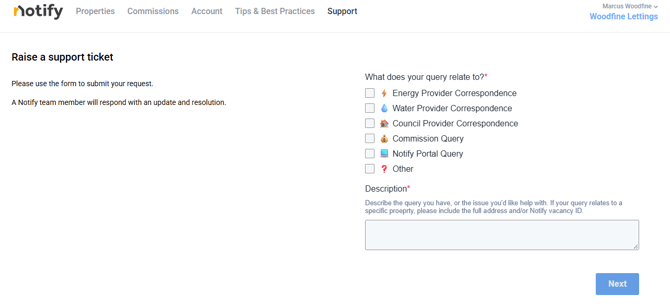
- Choose the relevant query category (e.g., Energy, Water, or Council Provider Correspondence).
- Enter a clear description of the issue, including the full property address or Notify vacancy ID.
- Upload a copy of the incorrect bill along with any supporting documents.
What happens next?
- Information check: Our support team may reach out if we need additional documentation to act on your behalf, such as a Letter of Authority or Tenancy Agreement.
- Supplier resolution: Once we have everything needed, your ticket will be escalated to our Commercial Operations team, who will liaise directly with the supplier to get the bill corrected so you don't have to.
If you are having any trouble logging into your portal you can also raise support tickets by emailing notify@oneutilitybill.co where are team are happy to help.