
Only Organisation Managers can view and withdraw commission.
How to view your commission structure:
- Log into your Notify portal.
- Go to the Account tab.
- Scroll down below your bank details to find your Commission Rules.
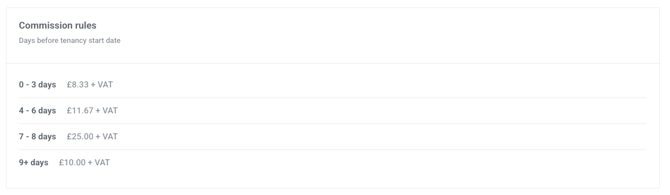 (The above commission rules is an example that came from our 2022 commission structure)
Need to withdraw commission?
Check out our guide on how to withdraw your commission through the portal for step-by-step instructions.